On This Page
Head Contractor:
SOPA Payment Schedule Response Deadline (NSW)
Scenario
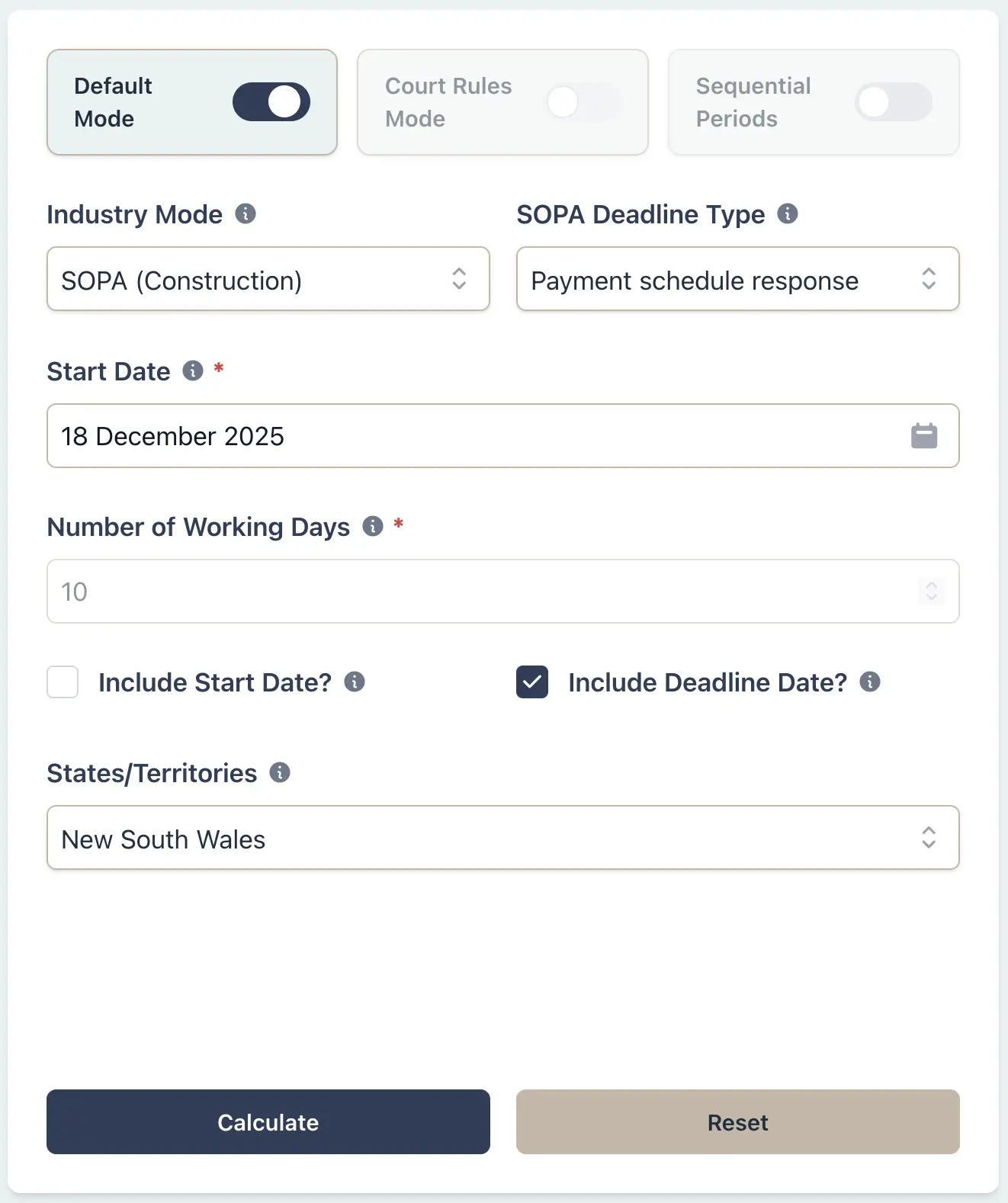
A head contractor receives a payment claim on 18 December 2025 for a Sydney project. Under the NSW Building and Construction Industry Security of Payment Act 1999, a payment schedule must be served within 10 business days after receipt. Time does not run during the statutory shutdown (27-31 December). If the schedule is late, the contractor is deemed to have accepted the claim and must pay the full amount.
Example Workflow
Result Example
Payment claim received: 18 Dec 2025
Response deadline: 10 business days (excluding 27-31 Dec shutdown)
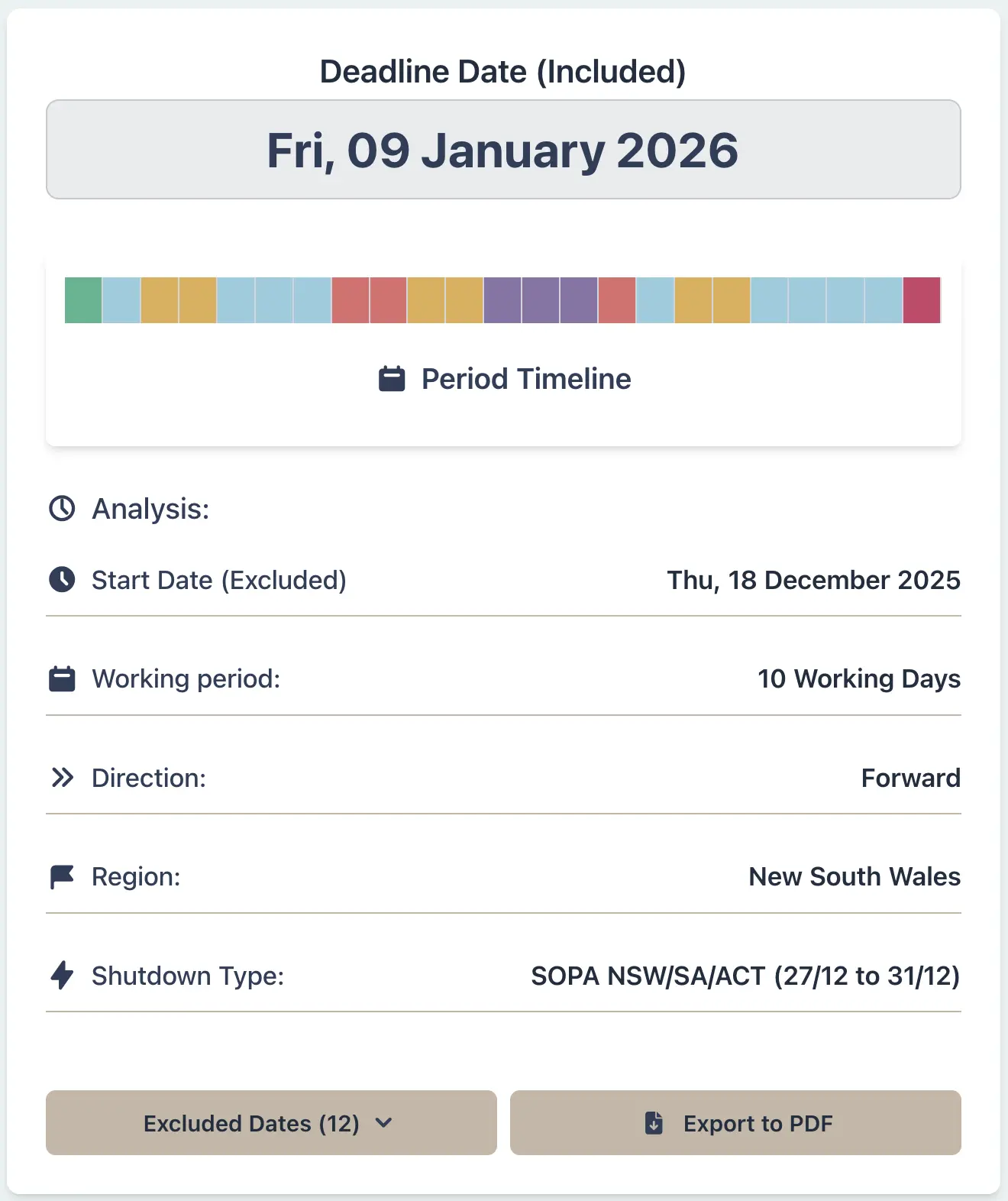
Final deadline: 9 Jan 2026
The shutdown window adds 5 business days, pushing the deadline to 9 Jan 2026. Victoria has no shutdown exclusion, so the same claim would be due on 6 Jan 2026.
Why This Matters
- •Automatically excludes the SOPA shutdown window (27-31 December) for NSW/SA/ACT jurisdictions
- •Prevents costly errors that could result in deemed acceptance of payment claims
- •Accounts for strict SOPA timeframes that differ by state and territory
- •Provides audit trail for dispute resolution and adjudication proceedings
Litigation Solicitor:
Defence Filing Deadline During Court Vacation (VIC)
Scenario
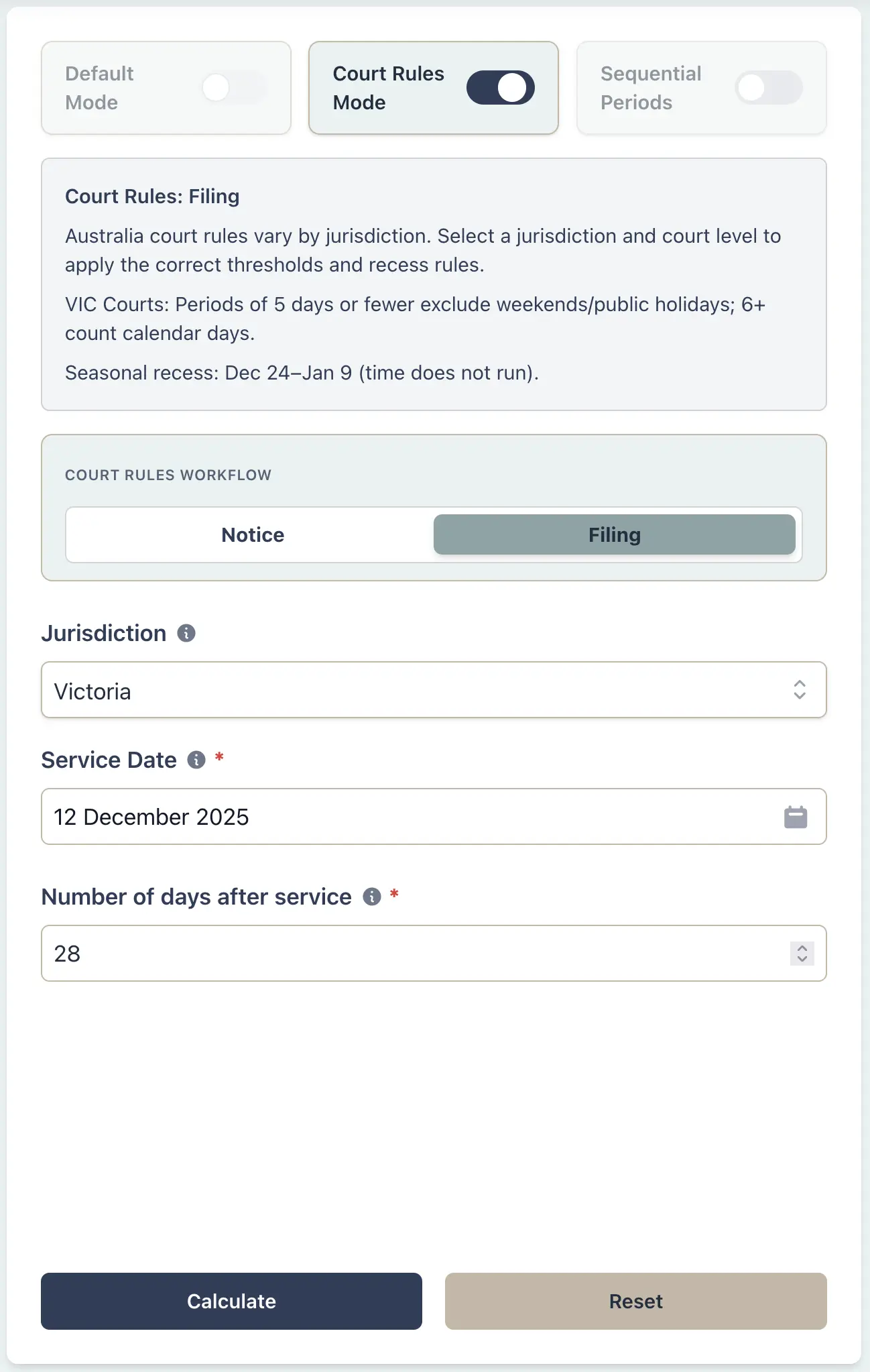
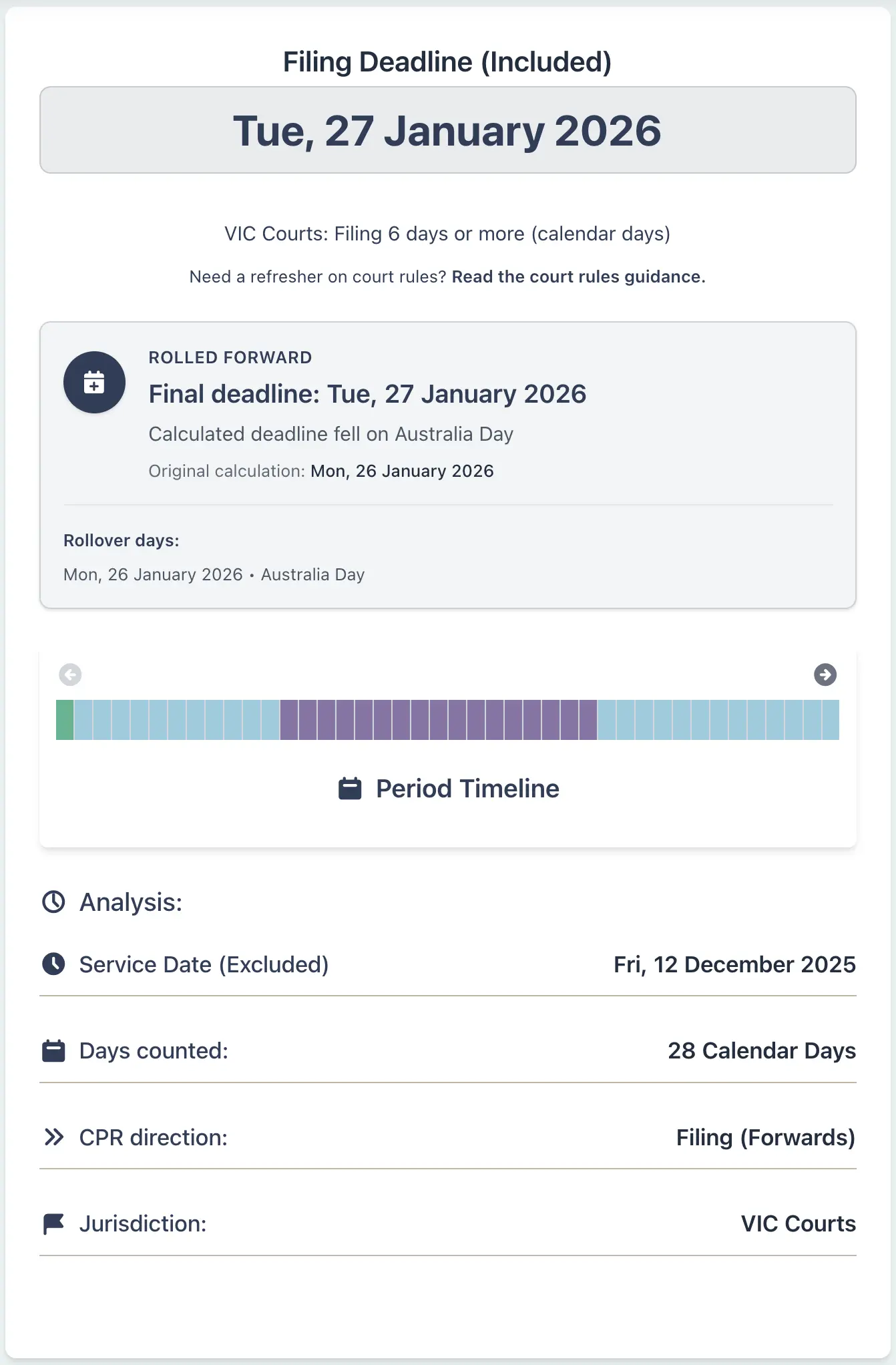
A litigation solicitor in Melbourne is served with a statement of claim on 12 December 2025. Under the Victorian Supreme Court Rules (Order 14.05), a defence must be filed within 28 days after service. However, the Victorian court vacation period runs from 24 December to 9 January, during which time does not run for the purposes of calculating deadlines (Order 63.04). The solicitor must determine when the defence is actually due, accounting for the vacation period. Filing late would expose the client to default judgment.
Example Workflow
Result Example
Statement of claim served: 12 Dec 2025
Standard deadline: 28 days = 9 Jan 2026
Court vacation: 24 Dec 2025 to 9 Jan 2026 (17 days suspended)
Actual deadline: 27 Jan 2026
The Victorian court vacation means time does not run for the entire period, extending the deadline by 17 days. The deadline then rolls forward because 26 January is Australia Day, making the filing due on 27 January. Without accounting for this suspension, the defence would appear due during the vacation when the court is closed for non-urgent matters.
Why This Matters
- •Correctly applies VIC Supreme Court vacation suspension rules (Order 63.04)
- •Prevents missed deadlines that would result in default judgment
- •Accounts for the 17-day suspension period during court vacation
- •Ensures compliance with Victorian Civil Procedure Act requirements
HR Manager:
Multi-State Employment Notice Period (King's Birthday)
Scenario
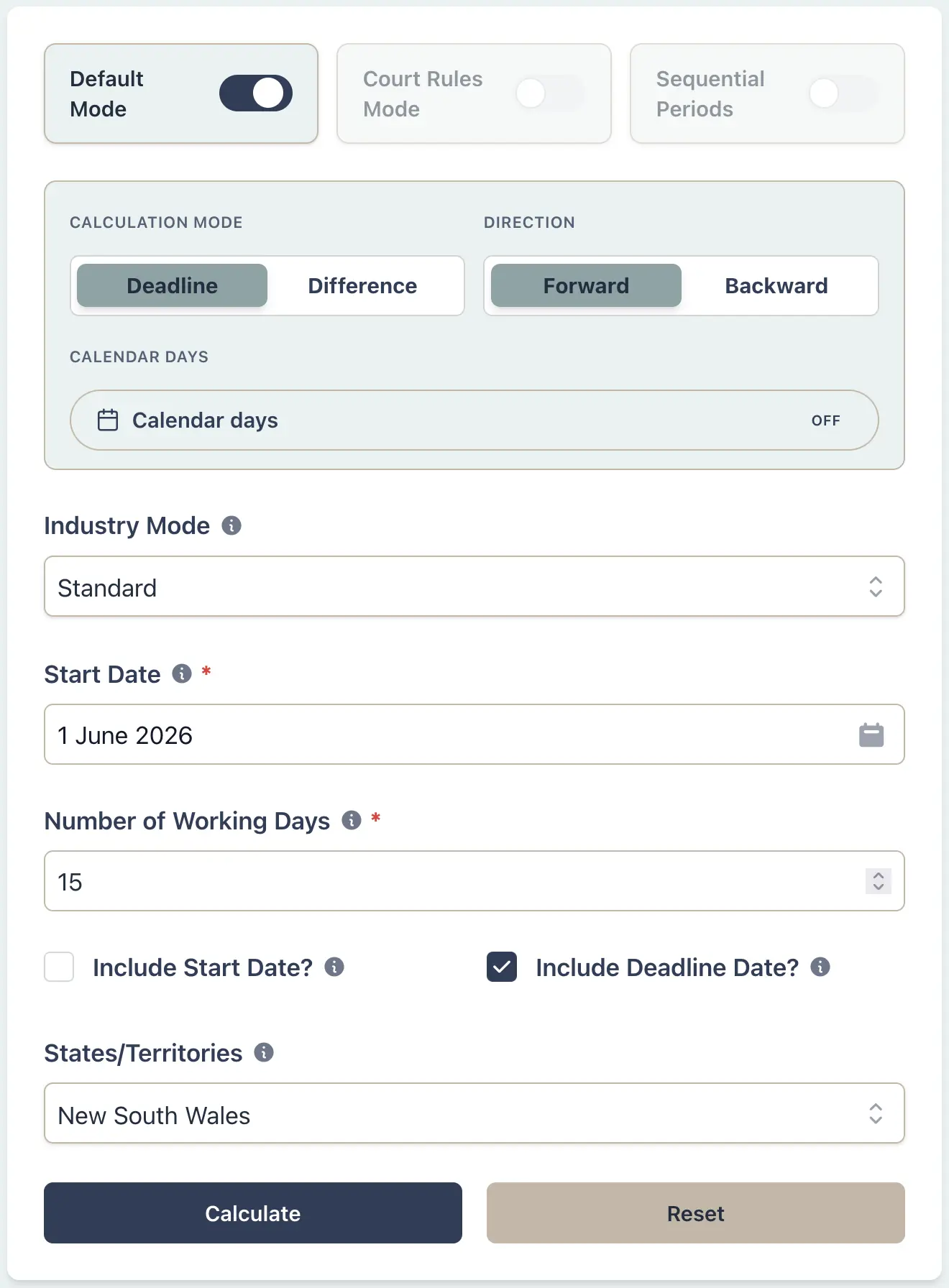
An HR manager for a national retail chain needs to give a 15 working day consultation period under an enterprise agreement clause and Fair Work Act consultation obligation for proposed roster changes, starting 1 June 2026. The company has stores in both Sydney and Brisbane. In NSW and most states, the King's Birthday public holiday is observed on the second Monday of June (8 June 2026). However, Queensland moved this holiday to October to avoid school holiday conflicts. This means employees in NSW will have a different consultation deadline than those in Queensland for the same 15 working day period.
Example Workflow
Result Example
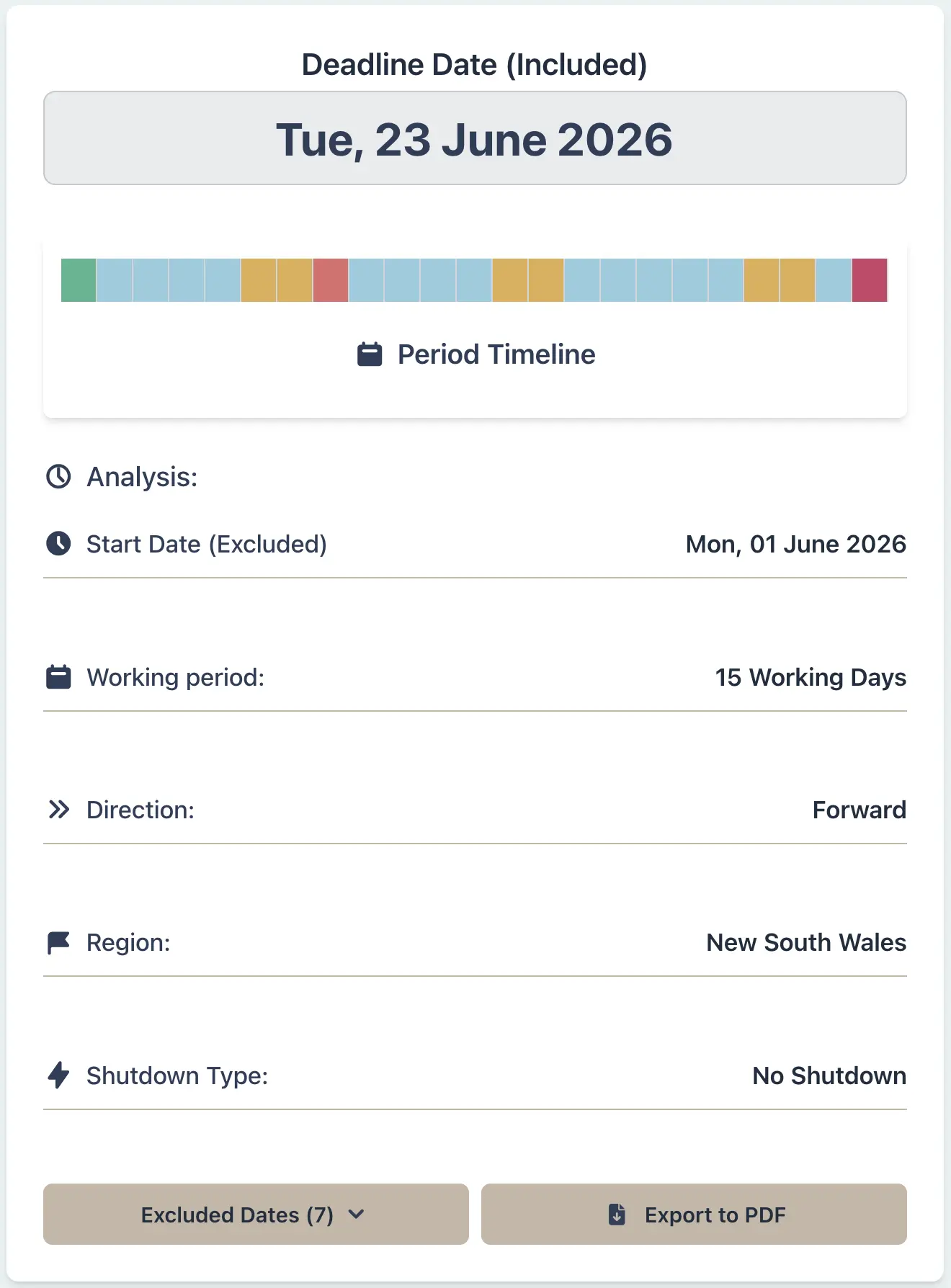
Notice issued: 1 June 2026
NSW deadline: 23 June 2026 (excludes King's Birthday 8 June)
QLD deadline: 22 June 2026 (King's Birthday not in June)
The three-day difference highlights the importance of jurisdiction-specific calculations for multi-state employers. Western Australia also varies (King's Birthday set by proclamation, usually late September/October), while most other states follow the second Monday of June rule.
Why This Matters
- •Correctly accounts for King's Birthday on different dates across states
- •Prevents confusion for multi-state employers with staff in different jurisdictions
- •Ensures compliance with state-specific public holiday calendars
- •Highlights the importance of jurisdiction selection for accurate calculations
Construction Manager:
Contract Milestone Across Melbourne Cup Day
Scenario
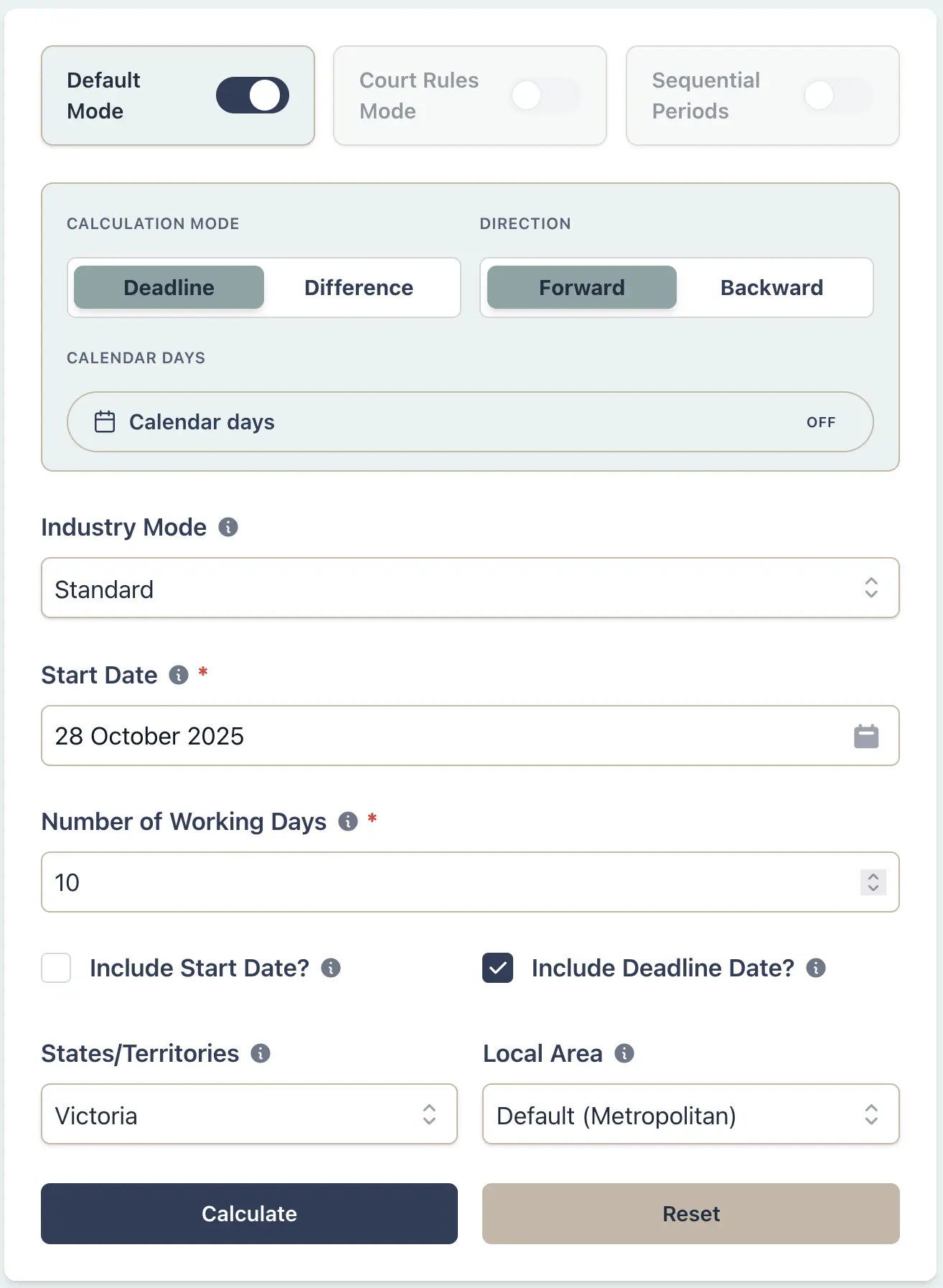
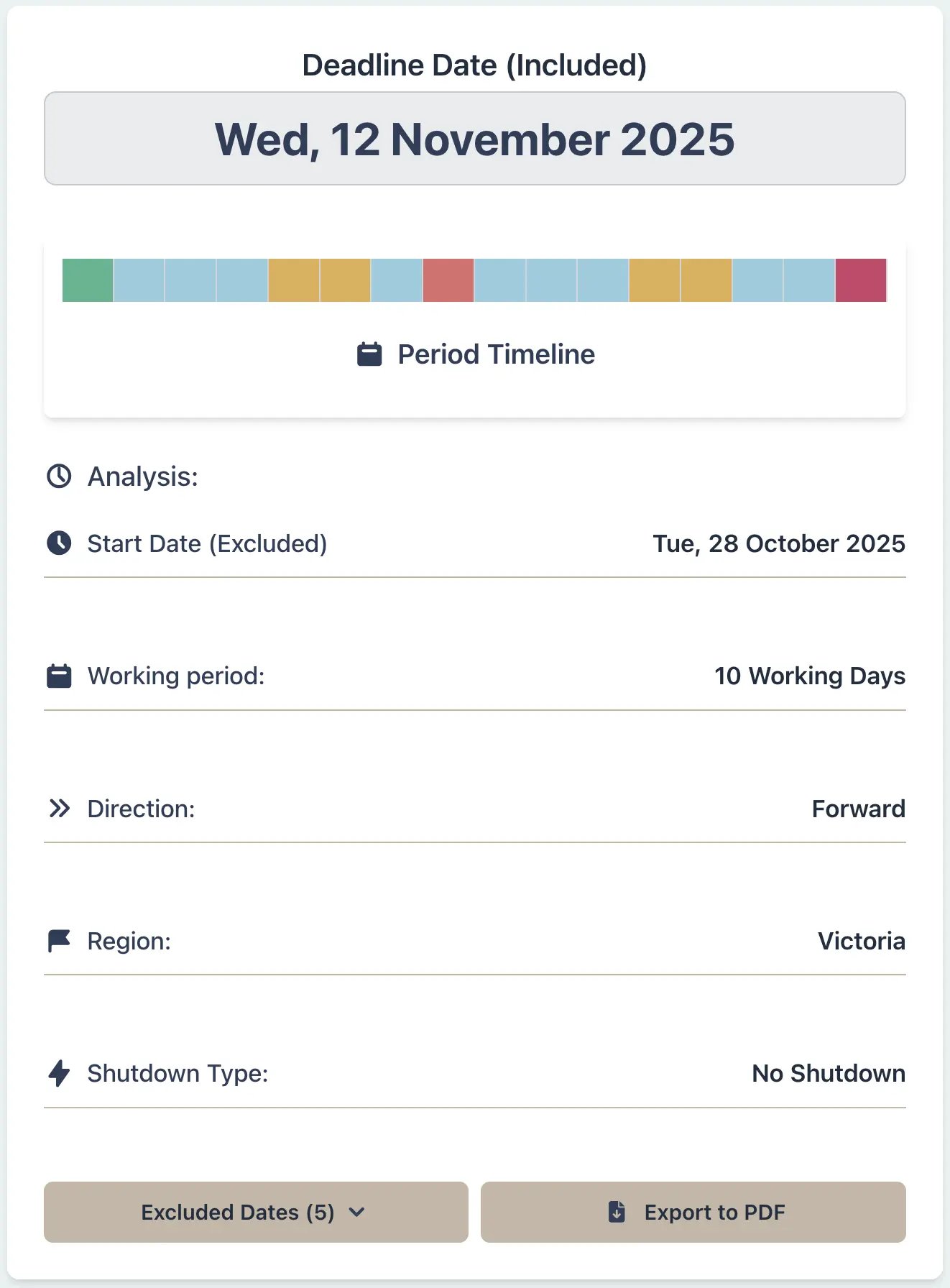
A construction manager oversees a large infrastructure project with work sites in both metropolitan Melbourne and regional Ballarat. A contract variation notice is issued on 28 October 2025, and subcontractors have 10 working days to respond. Melbourne Cup Day (first Tuesday of November - 4 November 2025) is a public holiday in metropolitan Melbourne and some regional areas of Victoria, but not in Ballarat for this scenario. This creates a deadline discrepancy: the Melbourne crew has until 12 November, while the Ballarat crew's deadline is 11 November.
Example Workflow
Result Example
Variation notice: 28 Oct 2025
Metro Melbourne deadline: 12 Nov 2025 (excludes Cup Day)
Ballarat deadline: 11 Nov 2025 (Cup Day not observed)
Melbourne Cup Day (4 November) is a public holiday only in defined metropolitan areas and some regional councils that choose to observe it. In this scenario, Ballarat does not observe the holiday, creating a one-day difference in working day calculations for the same state. This is unique to Victoria and highlights the complexity of geographic boundaries within state jurisdictions.
Why This Matters
- •Accounts for Melbourne Cup Day (first Tuesday in November) as a VIC public holiday
- •Highlights geographic boundary issues within a single state
- •Prevents scheduling conflicts for projects spanning metro and regional areas
- •Essential for construction contracts with crews working across multiple LGAs
Conveyancer:
Property Settlement Spanning Christmas (NSW vs SA)
Scenario
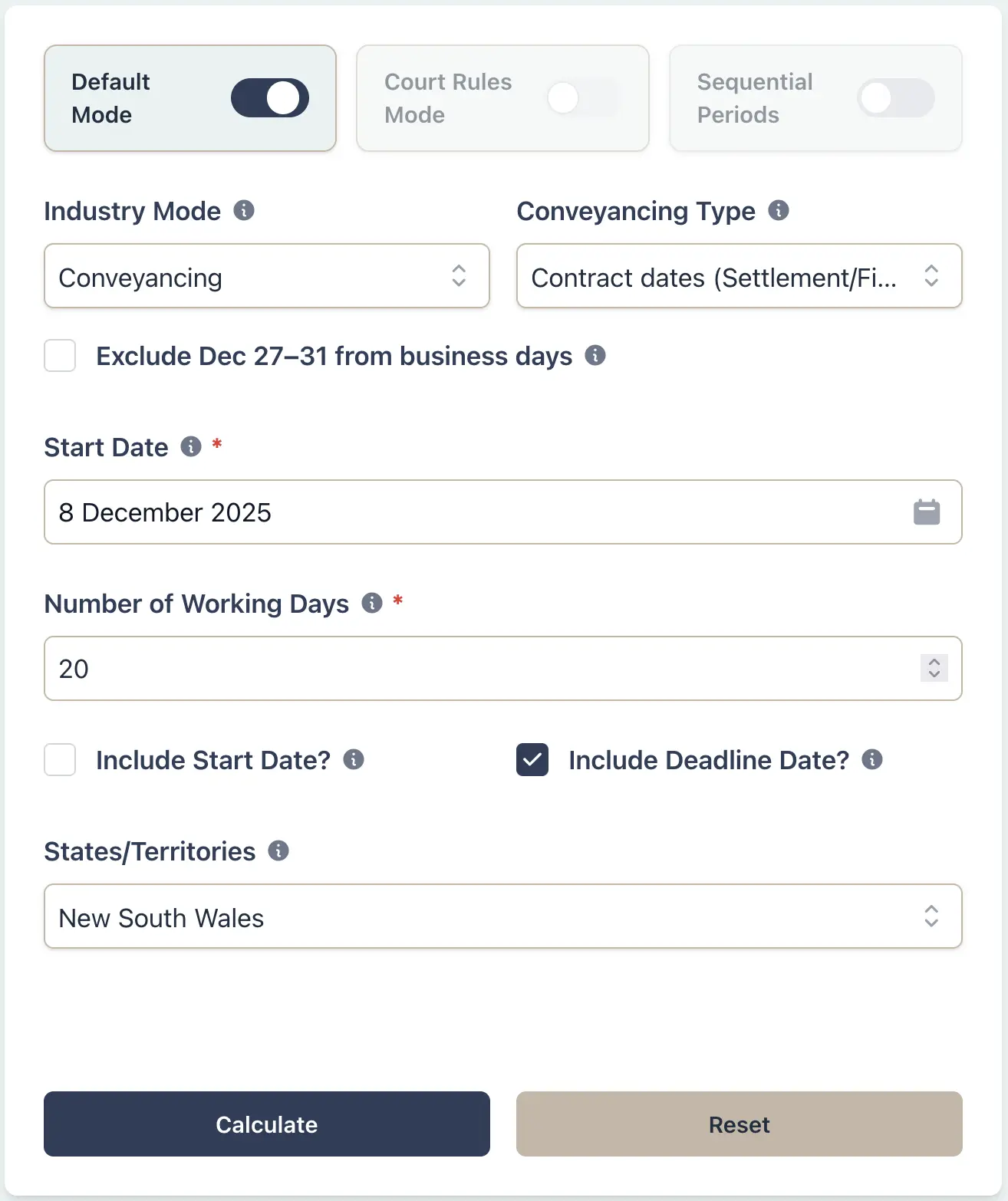
A conveyancer is handling property settlements in both Sydney and Adelaide with contracts exchanged on 8 December 2025. Both contracts specify settlement 20 business days after exchange, but banking and PEXA settlement windows tighten around late December. On 26 December, NSW observes Boxing Day while South Australia observes Proclamation Day, so the same date is a public holiday in both states but for different reasons. The conveyancer needs to align settlement dates with bank availability and settlement agent workflows while applying the correct state holiday rules.
Example Workflow
Result Example
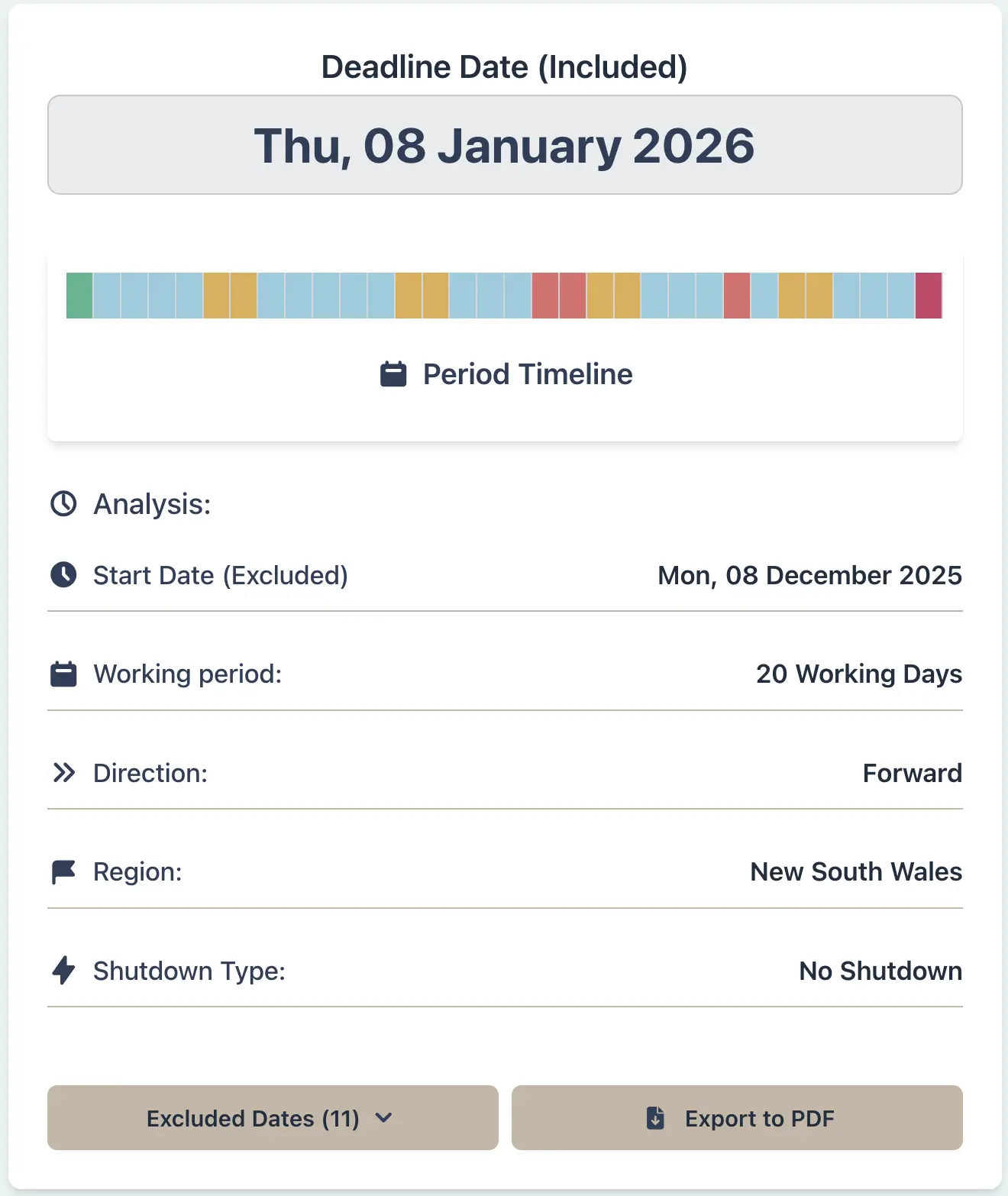
Contract exchange: 8 Dec 2025
Settlement period: 20 business days
NSW settlement date: 8 Jan 2026 (excludes Boxing Day)
SA settlement date: 8 Jan 2026 (excludes Proclamation Day)
While both states have the same result in this example (because they both observe a public holiday on 26 December), the operational issue is bank and PEXA availability around the Christmas period. The holiday names differ by state, but the practical impact is the same: settlement windows tighten, and cross-border matters need careful date checking.
Why This Matters
- •Aligns settlement dates with bank and PEXA availability around late December
- •Applies standard conveyancing shutdown period exclusions where appropriate
- •Prevents settlement date disputes between vendors and purchasers
- •Ensures compliance with state-specific contract terms and public holiday calendars
Contracts Administrator:
Contract Notice Period Spanning Show Days (QLD)
Scenario
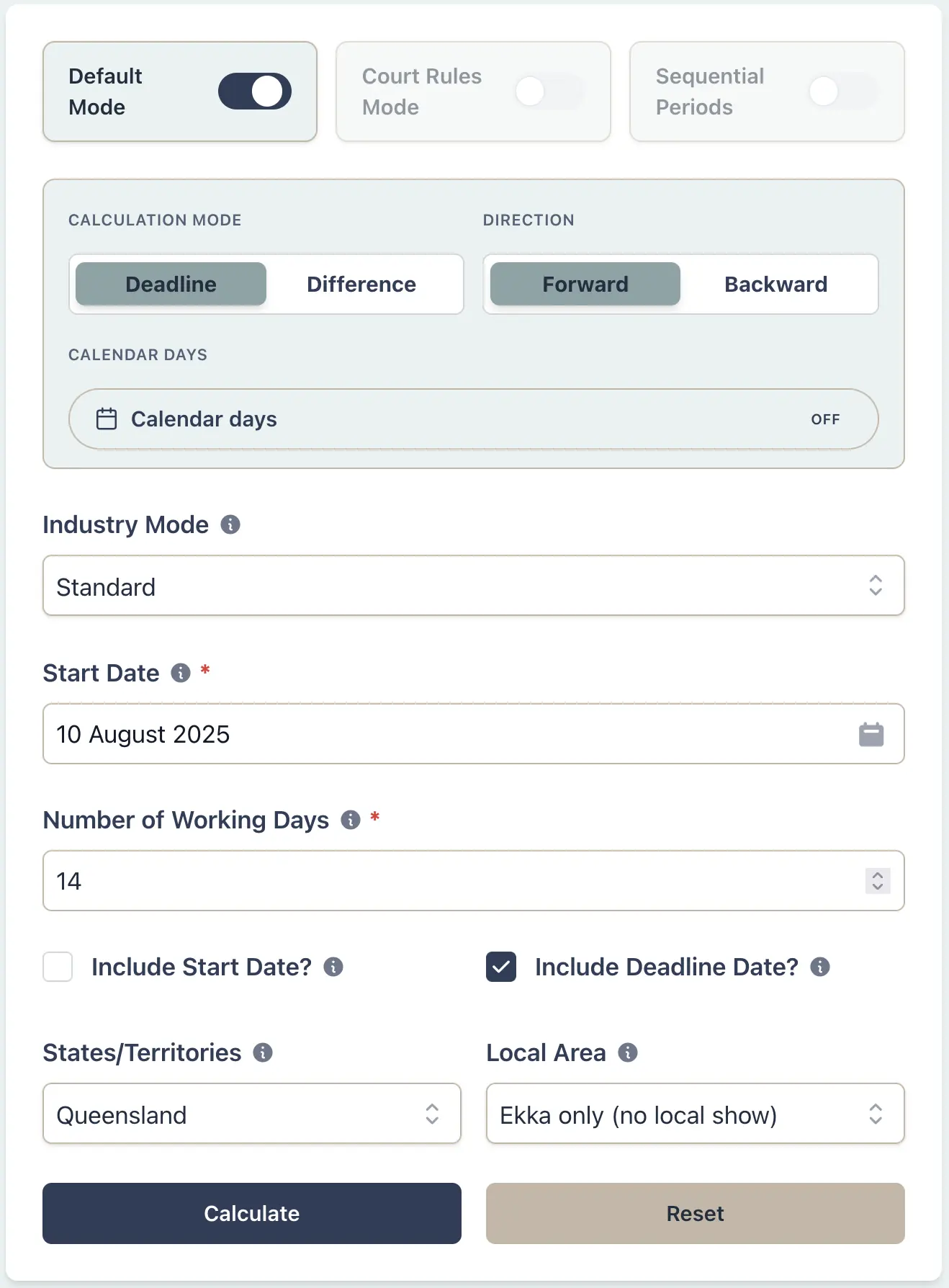
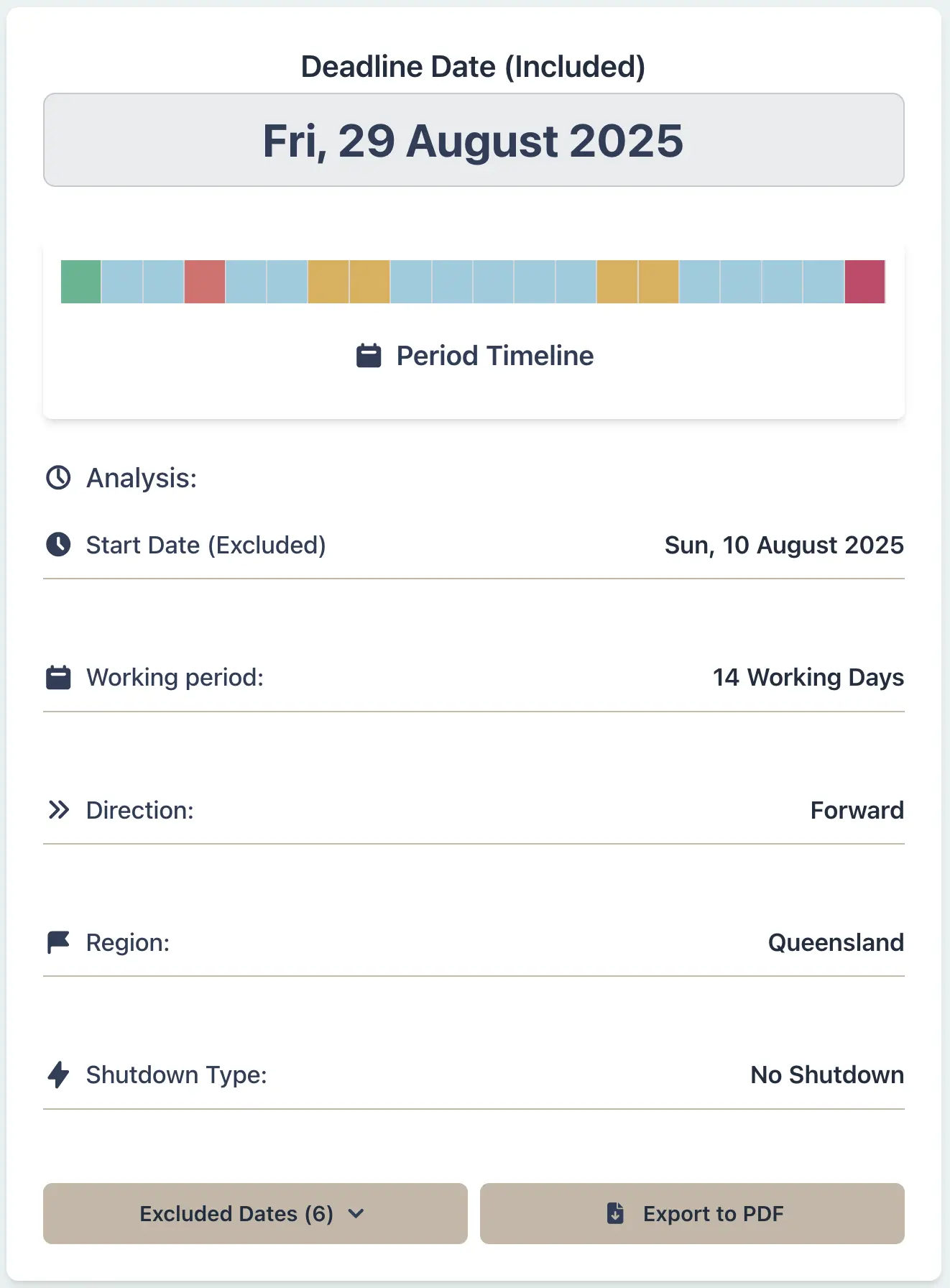
A contracts administrator for a mining company is issuing contract variation notices to contractors working on projects in both Brisbane and the Gold Coast. The contract adopts local public holidays at the place of work, and the notice is issued on 10 August 2025 with contractors required to respond within 14 working days. In Queensland, the Royal Queensland Show (Ekka) is observed statewide on 13 August 2025 (Wednesday of the second week of August). The Gold Coast also has a local show day on 29 August 2025, which adds a second non-working day for that area. Queensland has over 70 gazetted local show days, each applying only to specific local government areas.
Example Workflow
Result Example
Contract notice: 10 Aug 2025
Brisbane deadline: 2 Sep 2025 (excludes Ekka 13 Aug)
Gold Coast deadline: 3 Sep 2025 (excludes Ekka + Gold Coast Show 29 Aug)
Queensland's system of show day holidays is the most complex in Australia. The Ekka date applies statewide, and regional areas can also have their own additional local show days. Each local show day is gazetted for specific LGA boundaries, creating over 70 possible variations across the state in any given year.
Why This Matters
- •Applies the Ekka statewide holiday plus any local show day for the selected area
- •Highlights the complexity of 70+ local show days across Queensland
- •Prevents missed deadlines due to local government area-specific holidays
- •Essential for contracts that adopt local public holidays at the place of work
Litigation Lawyer:
Court Notice During WA Court Vacation (Longest Suspension)
Scenario
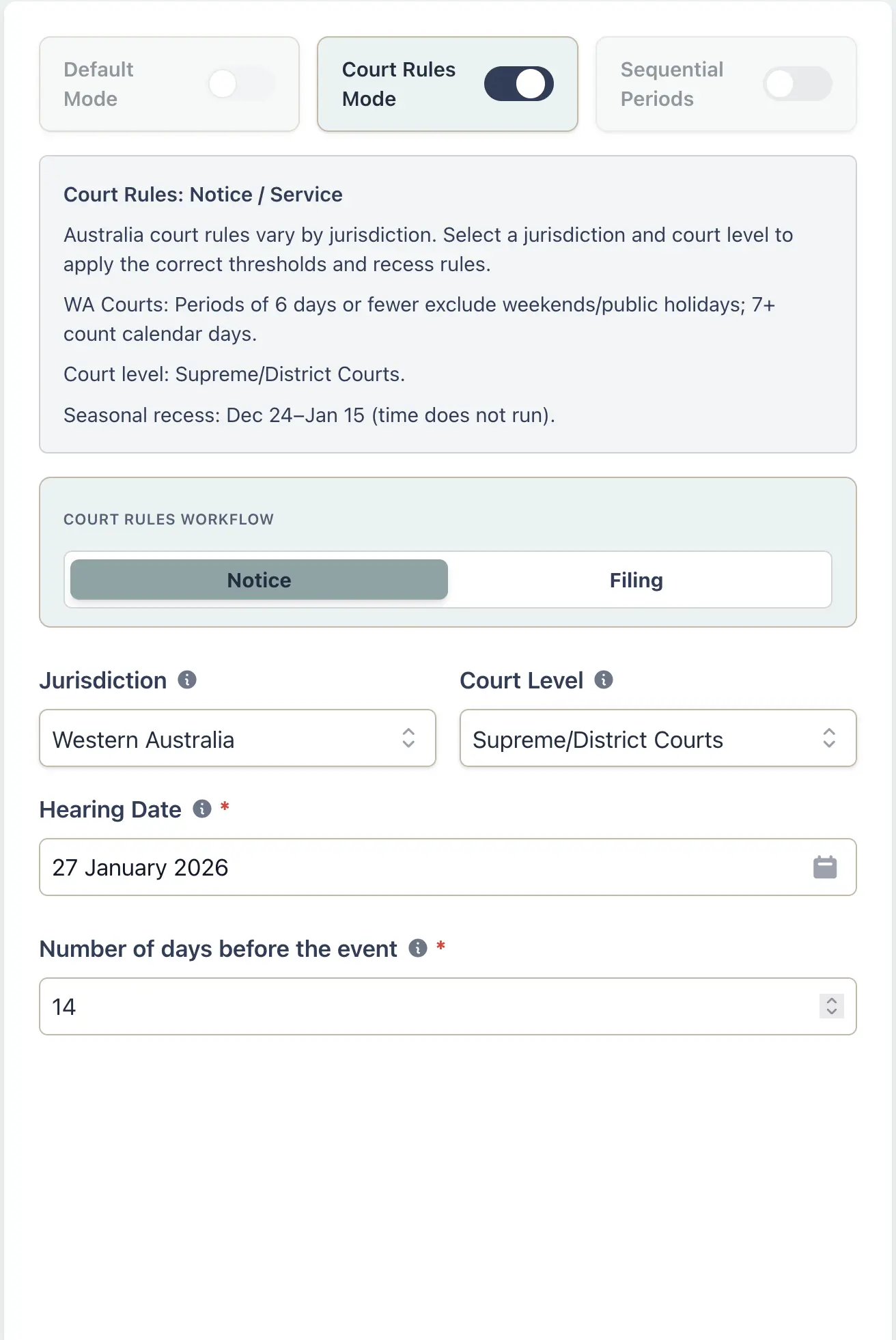
A litigation lawyer in Perth has a WA Supreme Court hearing scheduled for 27 January 2026 and must serve a 14-day notice of hearing. In WA, time does not run during the court vacation (24 December to 15 January) for Supreme and District Court matters. WA also uses a 6-day threshold: notices of 6 days or fewer are counted in working days, while 7 days or more use calendar days. The lawyer needs the correct service date before the recess.
Example Workflow
Result Example
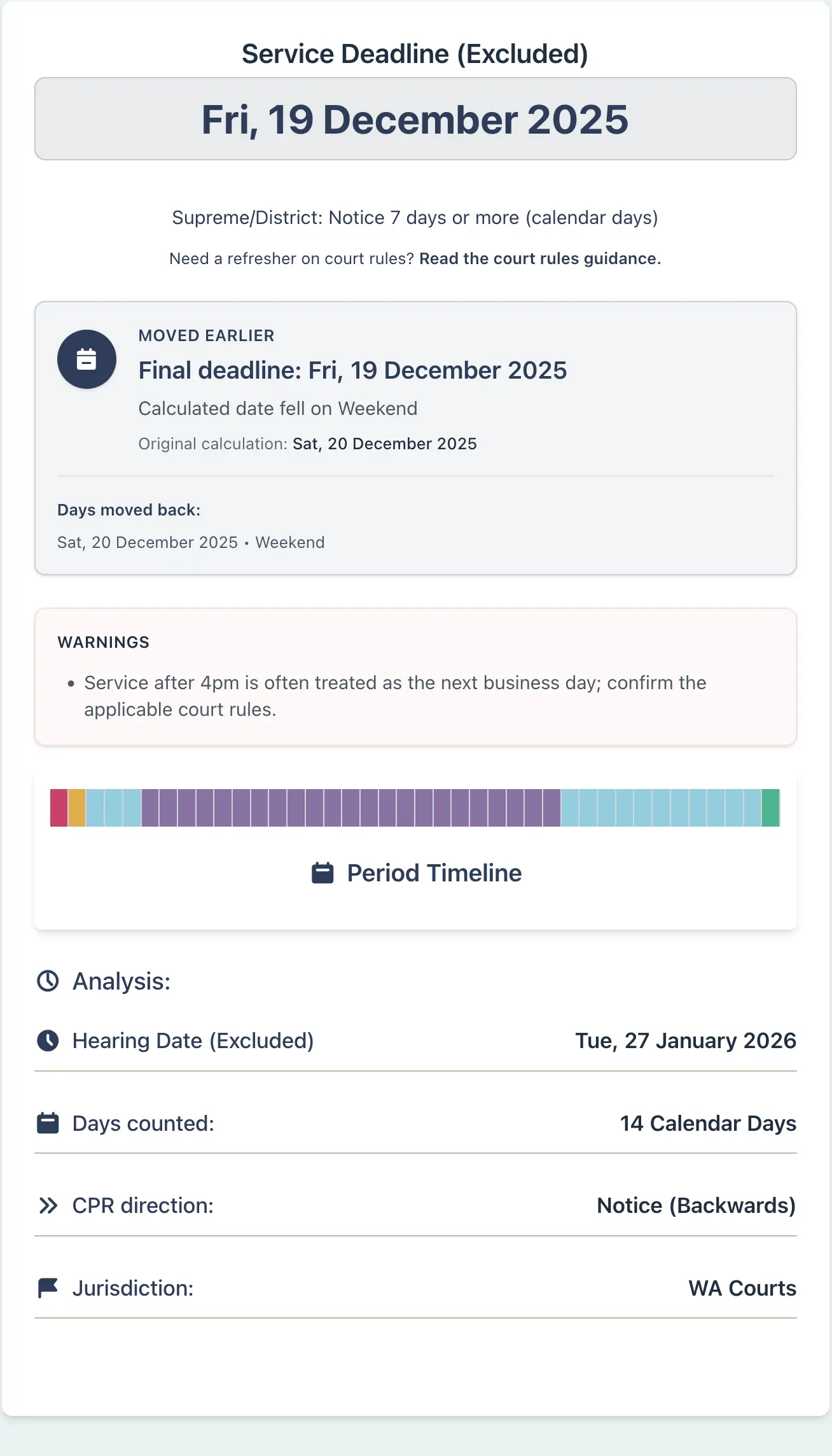
Hearing date: 27 Jan 2026
Notice period: 14 days before hearing (calendar days)
WA court vacation: 24 Dec 2025 to 15 Jan 2026 (23 days suspended)
Service deadline: 19 Dec 2025
WA's vacation means time does not run from 24 Dec to 15 Jan, so the service deadline falls before the recess. In this example the calculated date lands on a Saturday (20 Dec), so it rolls to the prior business day. The 6-day threshold is also different to most states, which use a 5-day threshold, so short notices can behave differently in WA.
Why This Matters
- •Applies WA's unique 23-day court vacation suspension (longest in Australia)
- •Correctly implements WA's 6-day threshold rule (vs 5 days in most states)
- •Prevents calculation errors that could result in deemed service or missed deadlines
- •Accounts for different vacation modes for Supreme/District vs Magistrates courts